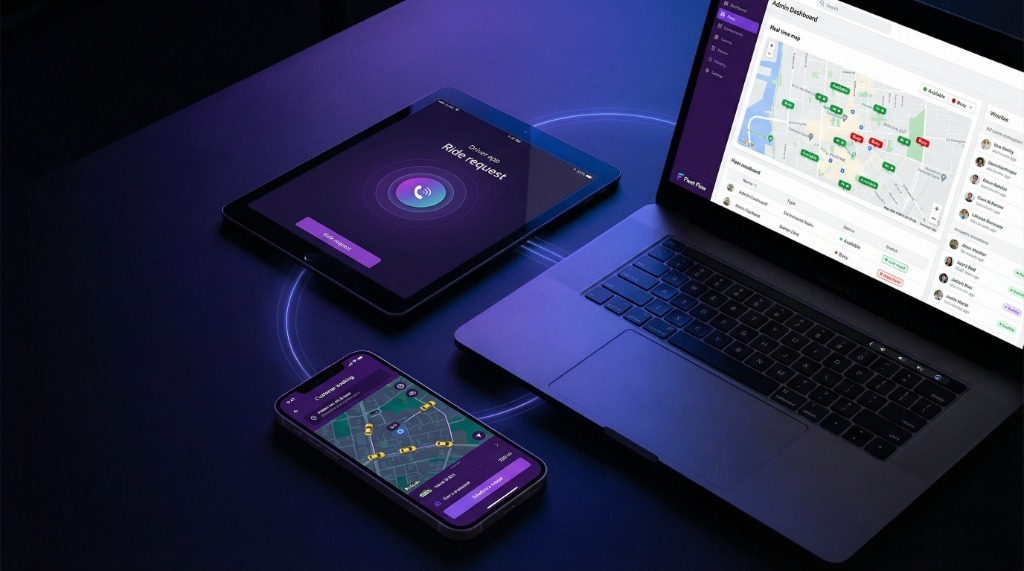
A taxi app admin panel is the operator control centre behind the customer and driver apps. This guide covers how it synchronises live ride data, applies dispatch rules, manages exceptions, and turns completed trips into operational reporting. For the passenger-to-driver sequence itself, start with the taxi booking app workflow.
That business model is dead.
Today, that dispatcher is code. And if your code is bad, your business is dead. It’s that simple.
💡 Related Insight: Discover How to Monitor and Improve Driver Behavior Analytics to optimize your operations.
Building a taxi app with admin panel without understanding the tech ecosystem is like trying to climb Everest in flip-flops. You will die on the mountain.
Most founders make the same fatal mistake: they obsess over the Customer App (because it looks cool) and ignore the Admin Panel (because it looks boring).
But the taxi app software with admin panel is not just about the interface. It's about the logic that ties them together.
A complete taxi app with admin panel should connect passenger demand, driver availability, dispatch rules, billing, and reporting from the same backend.
What Is a Taxi App With an Admin Panel?
Stop looking at it as an 'app'. It is not an app. It is a digital logistics empire packed into three screens.
A robust ready made taxi app with admin panel consists of three distinct entities that constantly talk to each other. If one stops talking, the whole system crashes.
- The Customer App: The demand generator. This is where money enters the system.
- The Driver App: The supply network. This is where the service is executed.
- The Admin Panel: The brain. This is where you control the chaos.
This research outlines exactly how these three integrate. We are going to look at the customer taxi booking app workflow, the taxi driver app workflow, and the specific taxi admin panel workflow that powers unicorns like Uber and Bolt.
If you are looking to buy taxi app with admin panel, this is the only guide you need to read.
For broader market context, read the 2026 Taxi Dispatch Software & FHV Fleet Industry Report.
Customer App Workflow (Booking → Ride → Payment)
Your customer app is your storefront. It needs to be frictionless. In the ride booking app customer journey, every millisecond of delay costs you revenue.
Here is how taxi booking app works from the user's perspective:
The user opens the app. The taxi app backend architecture instantly queries the database: 'Where are the cars?' It displays available cars on a map. This is psychological. If I see moving cars, I trust the service.
User enters destination. The app calculates: Distance, Time, and Estimated Fare. This requires a Google Maps API integration. The user taps 'Book Now'. This sends a JSON payload to your server with coordinates.
User sees 'Finding your ride...'. This is where your taxi app management system is working overtime to match the supply. Once matched, the user gets driver details: Name, Car No, Rating.
GPS tracking starts. User can share the ride. Upon completion, the payment is deducted automatically via wallet or card. This requires a secure white label taxi app with admin panel that is PCI compliant.
A custom taxi app with admin dashboard allows you to tweak this flow. Want to add a 'Ride Later' feature? You can. Want to add 'Split Payment'? You can.
Driver App Workflow (Requests → Navigation → Earnings)
Drivers are not tech nerds. They are working. They are tired. The taxi driver app workflow must be designed for speed and clarity.
If your driver app for taxi booking system is complicated, they will switch to your competitor. Here are the taxi driver app features that matter:
- The Ping (Job Offer): Do not make it subtle. It needs to be a loud, full-screen notification. The driver has 15 seconds to accept. If they miss it, the taxi dispatch system admin panel re-routes it to the next driver.
- Smart Navigation: Do not build your own maps. Integrate Google Maps or Waze. The app should auto-open navigation upon pickup.
- Earnings Dashboard: This is the most checked screen. 'How much did I make today?' A reliable taxi booking app with admin dashboard updates this in real-time.
The secret sauce here is the 'Go Online/Offline' toggle. This single button tells the admin panel for taxi booking app who is available to work.
Admin Panel Workflow (Control, Analytics, Dispatch)
Now we get to the core. This is what you are really evaluating. The taxi admin panel workflow is your command center.
A taxi app with admin panel without a strong dashboard is just a toy. This is where you play God.
So, how does a taxi app admin panel work? It aggregates millions of data points into actionable insights.
See every car. Green = Free. Red = Busy. Grey = Offline. You can manually assign rides if needed using the taxi app admin controls. This is crucial for VIP clients. Learn more about manual dispatch.
Driver documents expiring? The taxi app backend dashboard alerts you. Customer cancelling too often? Block them. This is your HR and Customer Service department in one screen.
Set your commission rates. Manage payouts. Handle refunds. A scalable taxi app admin system handles multi-currency and automated driver payouts.
The taxi app analytics dashboard tells you where the money is. 'Demand is high in Downtown at 6 PM.' You send a push notification to drivers: 'Go Downtown for 1.5x earnings.'
This is the major difference between taxi app and admin panel. The app is for the user; the panel is for the business owner.
How All Three Systems Sync in Real Time
This is the magic trick. Taxi app driver customer admin integration relies on something called WebSocket technology.
It’s a 300ms handshake that happens 50 times a ride.
Control comparison
What changes when every branch uses one system
Step 1: Customer taps 'Book'. Admin Panel registers a 'New Request'.
Step 2: System filters drivers. Admin Panel logs 'Searching...'.
Step 3: Driver accepts. Admin Panel updates status to 'Trip Started'. Customer sees 'Driver Coming'.
Step 4: Trip ends. Payment processes. Admin Panel splits the money: 80% to Driver wallet, 20% to Company wallet.
If you buy a cheap script, this sync fails. The driver sees 'New Trip', but the customer sees 'Cancelled'. That is how you lose a business.
Key Admin Panel Features That Drive Business Growth
When you are evaluating a taxi app solution with admin panel, look for these specific money-making features:
- Surge Pricing: Automatically increase prices when demand > supply. The taxi app admin panel features must allow you to configure this logic.
- Geofencing: Draw a zone on the map (e.g., Airport). Add a fixed surcharge. This is pure profit.
- Dispatcher Panel: For phone bookings. A manual interface for your call center to input rides for older customers who don't have smartphones.
- Role Management: Give your accountant access to 'Earnings' but not 'Dispatch'. Secure your data.
Why Businesses Choose White-Label Taxi Apps With Admin Panels
I talk to founders every day. They ask: 'Should I build from scratch or buy white-label?'
The answer is math.
Building a taxi app development with admin panel from scratch takes 6-9 months and costs $50,000+. You are paying for failures, bug fixes, and server crashes.
A white label taxi app with admin panel like FleetFlow is ready in 7 days. It is battle-tested. It has already processed thousands of rides.
Why reinvent the wheel when you can just buy the car?
How to Choose the Right Taxi App Solution
Your decision creates your destiny. Do not cheap out on the engine of your business.
Look for a taxi app control panel for business owners that is intuitive, fast, and scalable. Look for a team that supports you after the launch.
Don't just buy code. Buy a partner.
Frequently Asked Questions
How does a taxi app admin panel work?
A taxi app admin panel acts as the central brain of your operation. It connects the customer app and driver app, allowing you to manage dispatching, track vehicles in real-time, handle payments, and view analytics - all from a single dashboard.
What is the main difference between the taxi app and the admin panel?
The taxi app is the front-end interface used by passengers to book rides and drivers to accept them. The admin panel is the back-end control center used by business owners to monitor the entire fleet, set prices, and manage users.
How do the driver, customer, and admin systems integrate?
They integrate via real-time WebSocket technology. When a customer books a ride, the request is sent to the consumer (Admin), which instantly pushes it to the nearest available driver. Current location data is synced every few seconds across all three platforms.
Do I need coding skills to manage the taxi app control panel?
No. A modern taxi app control panel for business owners like FleetFlow is designed to be intuitive and code-free. If you can use email or Facebook, you can manage your entire taxi fleet.
Recommended Next Read: What is Telematics in Fleet Management?